国土交通省のMOTOSダウン(2021/10/1)
システム障害の障害概要と所管を記載しています。
■概要
自動車登録検査業務電子情報システム(MOTAS)の障害。
MOTASは運輸支局や自動車登録事務所ので利用される自動車業務登録業務を担うシステム。8:55にMOTASのシステム障害発生。それに引きずられる形で、自動車保有手続きnワンストップサービス(OSS)が停止。
OSSもMOTAS同様で、インターネット申請での自動車検査、登録ができるサービス。
10/1に技術情報手数料の徴収の新機能が追加になっており、その際この徴収システムで利用する情報がMOTASにあり、OSSで処理を行うDB接続が最大値を超えてしまいが停止、同様にOSSも停止となっている。
上限値でデータロストなどではないので同日中に復旧(MOTASは11時、OSSは14時半ごろ)となっている。
■所管
DBなどMWのキャパシティプランに関しては、突発的なものを含めてシステム計画をすると、余剰としてCTOに合わないこともあるので、都度イベントがあるタイミングを見越して、検証環境などで、シミュレーションするが、今回はMOTAS,OSSでの連携がうまくいっておらず発生したようなような事象になる。
こういった事案は、事象が起こって初めて、連携があったことやどれだけのデータ量、処理をまかっていたのかの全体システム統治ができていないために発生すると思われる。
システムの全体把握はデータ連携があるのでシステム管理者や、ドキュメントで把握できるものではなく、開発者、運用者を含めてシステム運用しないと気が付かない部分が多い。
一時前は、会議のメンバーなどを厳選してなど、無理無駄を省くような風潮が強かったが、人が流動的になっている昨今のITの現場は、全体把握が困難なため、もっといろんな人を関与させてシステムに対する気づきを促すようなオペレーションをしないとこういった事案はなくならない。
みずほ銀行8月障害(2021/8/20)
システム障害の障害概要と所管を記載しています。
■概要
勘定系システムとの店舗端末を連携させる機能の業務チャネル統合基盤での障害。
業務チャネル統合基盤システム上のDB(Symfoware Server)が稼働する外部ストレージでのDiskのFailが発生。冗長構成のDiskが複数Failしたことにより、外部ストレージのデータが破損。
システムはDBの冗長化として正副での構成となっており、DBサーバ副に切り替わるが、完全冗長構成でのデータ保全をする設定だったため、DBサーバ正副のデータ債があり、HAの切り替え失敗。
DBサーバ副の手動起動を実施するが、手順書不備のため切り替え失敗。
サイト間レプリケーションをしていたデータが残っていたため、メインセンターの千葉からサブセンターの千葉でのサービス起動をするが、9時の業務開始に間に合わず業務影響が発生。
■所管
得意分野なのだが、初動の対策としては、今回の障害の発端のDiskの予兆検知、予備交換は最低限必要だと考えられる。
そもそもDiskの多重障害の話はよくあり、Diskのロットで一斉に障害になるケースをよく聞くが、ハードサプライヤーは考慮がなく出荷時にDiskのこのなる製造ラインを混在するような対応はしてくれない。粘り強く交渉が必要。
記事内容からするとDBサーバは4台あり特に一般的に構成がおかしいとは思われない。ストレージ装置の冗長化も検討できるが、今回のメインセンターの正副の方が障害における対応に柔軟性がある。
Symfoware ServerとPRIMECLUSTER?を利用しているのかは不明だがHA製品との親和性の問題。2フェーズコミットでHWの完全同期でなく、おそらくSoftwareのレプリケーションのため正系の障害発生の際にデータロストが発生し、副の機能ができなかったのか。それともHA製品の不備なのか。いづれにせよ、正のストレージが障害発生したときに切り替わらないのはHAの設計不備。
副系の起動に失敗したのは、手順不備。手順不備があっても有識者がいればカバーできる範囲だと思うが、おそらくそのようなことができなかっただろう。
今までこのようなシステムのリストアリカバリ手順をそれなりに納品してきたが、有事の際に運用メンバーで戻せるとは思えない。
そもそも、専門性のある手順で、導入当初から何らかしらMWのバージョンアップや接続性、設定など変更しているのでそれを踏まえたリストアリカバリ手順をちゃんと管理していますという会社を見たことがない。
有識者をちゃんとかかえられないと、いざというときに運用を主体としたメンバーでは対応できないのでセキュリティと同じで有事の際を想定して、必要コストと認識し技術者をちゃんと育成して配置しておかないと対応できない。
NTTドコモ通信障害に関して(2021/10/14)
システム障害の障害概要と所管を記載しています。
■概要
IOTサービス(携帯電話とは別のHLR/HSS)のメンテナンスで新設備に切り替えの際に、新設備で不具合が発生したため、10/14 7時半ぐらいから切り戻しを実施。
この切り戻しの際に、位置登録(端末を利用するために必要な情報)を旧設備に移行の際、IOT(Internet of Things)端末の切り替えを20万台づつ、実施した際に、処理に耐え切れず輻輳が発生。
通常ユーザに影響が及ばない想定だったが、ネットワーク全体が高負荷になり、位置登録信号を制御することによって、ネットワーク保全を図るが、この制御が一律でしかできないため、ユーザ側の接続ができない事象が発生。
10/15 5時まで4Gの復旧がかかる事態になった。
■所管
今回の対象となるIoTは、タクシーの電子決済や自動販売機などの存圏情報を管理するもの。確かに作業対象の影響だけで見ると通常ユーザに影響がないもので切り戻しも想定では妥当な判断だったのだろうが、気になる点がある。
今回の事象の時間が想定作業時間だとすると、10/14 0-7時で作業実施/切り戻し判断があり、切り戻しが、今回の輻輳の発生した17時にかかってるのが計画通りであれば日中での処理が多くなる時間帯が作業想定になっていたのであれば計画自体に無理があったのではないか。
Teratermの自動ログイン設定(多段、ログ出力込み)
Teratermのログイン設定になります。
よく、踏み台経由で接続するので、簡素にまとめました。
| 変数 | 説明 | 参考 |
|---|---|---|
| HOSTADDR | 踏台IPアドレス | '192.168.11.62' |
| HOSTNAME | 踏台ホスト名 | 'rac111' |
| USERNAME | 踏台ユーザ名 | 'root' |
| PASSWORD | 踏台ユーザパスワード | 'rootroot' |
| HOSTADDR1 | 接続先ホスト名 | '172.18.254.101' |
| USERNAME1 | 接続先ユーザ名 | 'root' |
| PASSWORD1 | 接続先パスワード | 'rootroot' |
| LOGDIR | ログ出力先ディレクトリ | 'c:\temp\' |
# cat rac1111.ttl
| ;############################################ |
| ; Filename : sample-ssh.ttl |
| ; Description : Multi-stage SSH Login |
| ; Created : cabo 2019/01/12 |
| ; modified : xxxx xxxx/xx/xx |
| ;============================================ |
| ;; ユーザ名/パスワード設定 |
| HOSTADDR = '192.168.11.62' |
| HOSTNAME = 'rac111' |
| USERNAME = 'root' |
| PASSWORD = 'rootroot' |
| HOSTADDR1 = '172.18.254.101' |
| USERNAME1 = 'root' |
| PASSWORD1 = 'rootroot' |
| LOGDIR = 'c:\temp\' |
| ;============================================ |
| ;; [01]ログファイル設定 |
| getdate date "%Y%m%d" |
| gettime time "%H%M%S" |
| sprintf2 logfilename "%s_%s_%s_%s.log" HOSTNAME HOSTADDR1 date time |
| logfile = LOGDIR |
| strconcat logfile logfilename |
| ;; [02]コマンド組立て |
| COMMAND = HOSTADDR |
| strconcat COMMAND ':22 /ssh /2 /auth=passsword /user=' |
| strconcat COMMAND USERNAME |
| strconcat COMMAND ' /passwd=' |
| strconcat COMMAND PASSWORD |
| ;; [03]サーバへ接続 & ログ設定 |
| connect COMMAND |
| logopen logfile 0 0 |
| wait '#' |
| COMMAND = 'ssh ' |
| strconcat COMMAND USERNAME1 |
| strconcat COMMAND '@' |
| strconcat COMMAND HOSTADDR1 |
| sendln COMMAND |
| wait ':' |
| sendln PASSWORD1 |
| ;; [04]マクロ終了 |
| end |
expectを利用してssh処理を自動化してリモートコマンドを実行
Linuxのexpectのコマンドサンプルになります。
制御サーバから各々のサーバにコマンドを実行したかったのですがキー交換がシステム制約上できなかったので、簡単にラップ用のSHELLを作成しました。
JOBサーバを立てられないのでいまであれば、Ansibleとかするんでしょうが。。
| argv | 説明 | 例 |
|---|---|---|
| 0 | Host | 10.5.10.101 |
| 1 | LoginUser | oracle |
| 2 | PW | oracle |
| 3 | Command:実行コマンド、”くくりが必要 | ls -al |
# cat Comm_exe.sh
| #!/usr/bin/expect |
| # Logfile |
| log_file /var/log/Comm_exe.log |
| # Environment |
| set Host [lindex $argv 0] |
| set LoginUser [lindex $argv 1] |
| set PW [lindex $argv 2] |
| set Command [lindex $argv 3] |
| set Prompt "\[#$%>\]" |
| # Command TimeOUt |
| set timeout 5 |
| spawn env LANG=C /usr/bin/ssh ${LoginUser}@${Host} |
| expect { |
| "(yes/no)?" { |
| send "yes\n" |
| exp_continue |
| } |
| -re "password:" { |
| send -- "${PW}\n" |
| } |
| } |
| expect { |
| -glob "${Prompt}" { |
| send "uname -n;id\n" |
| } |
| } |
| expect { |
| -glob "${Prompt}" { |
| send "${Command}\n" |
| } |
| } |
| expect { |
| -regexp "\n.*\r" { |
| send "exit\n" |
| exit 0 |
| } |
| } |
# ./Comm_exe.sh 10.5.10.101 oracle oracle "ls -al"
spawn env LANG=C /usr/bin/ssh oracle@10.5.10.101
oracle@10.5.10.101's password:
Last login: Mon Jan 14 18:30:54 2019 from control-serv
[oracle@rac1111 ~]$ uname -n;id
rac1111
uid=500(oracle) gid=500(oinstall) groups=500(oinstall),501(dba),503(asmdba),505(asmadmin)
[oracle@rac1111 ~]$ ls -al
total 52
drwxr-xr-x. 4 oracle oinstall 4096 Jan 6 13:14 .
drwxr-xr-x. 6 root root 4096 Dec 29 08:17 ..
-rw------- 1 oracle oinstall 7605 Jan 14 18:29 .bash_history
-rw-r--r--. 1 oracle oinstall 18 Dec 22 2015 .bash_logout
-rw-r--r-- 1 oracle oinstall 468 Jan 5 20:23 .bash_profile
踏み台サーバ経由の接続、接続ユーザに通常コマンドを実行させない
一度、ホームネットワークを改ざんにあって破壊されたので再度、VPNでのリモート接続などを家向けに接続できるようにはしたが、すこしセキュリティを高めて公開用のユーザに対して、踏み台経由にてTrusted-Zoneに入れるようにしている。
踏み台のユーザ設定を以下のように行うと、ある程度実行コマンドは抑制される。とはいっても入られたらどうしようもない。。
-
SHELL作成&ユーザ作成
[telnet]
ユーザ作成時に、別シェルを準備してそのSHELLを適応するようにする。
# ln -s /bin/bash /bin/rbash
# useradd -u 10000 -g 10000 -m -d /home/hoge1234 -s /bin/rbash hoge1234
-
環境変数設定
[telnet]
履歴は残らないように、ホームディレクトリしかパスが通らないようにする。
# cat /home/hoge1234/.bash_profile
history -c
echo /dev/null > ~/.bash_history
export HISTCONTROL=ignoreboth
export HISTCONTROL=ignorespace
PATH=/home/hamamoto
export PATH
-
指定コマンドの配置
[telnet]
ホームディレクトリに、リンクで必要なコマンドを記載。ここではSSH接続をしたいので、リンクを作成。sshcommandで接続ができる。
# ln -s /usr/bin/ssh /home/hoge1234/.sshcommand
OracleHomeのClone作成
パッチの適応試験とか、別環境にDBのエンジンを移すのに便利。
runInstallerのオプションで-cloneを指定するのみ。
事前に$ORACLE_HOMEをtar-ball等で固めて、別ディレクトリに展開。
展開先をORACLE_HOMEとしてcloneとして登録。
-
CloneDBエンジンの作成
# export DISPLAY=192.168.11.1:0.0
# $ORACLE_HOME/oui/bin/runInstaller -silent -clone ORACLE_HOME="/opt/oracle/app/oracle/product/11.2.0/dbhome_3" ORACLE_HOME_NAME="dbhome3" ORACLE_BASE="/opt/oracle/app/oracle"
Starting Oracle Universal Installer...
Checking swap space: must be greater than 500 MB. Actual 4015 MB Passed
Preparing to launch Oracle Universal Installer from /tmp/OraInstall2019-01-06_02-41-06AM. Please wait ...[oracle@sp1111 11.2.0]$ Oracle Universal Installer, Version 11.2.0.4.0 Production
Copyright (C) 1999, 2013, Oracle. All rights reserved.
You can find the log of this install session at:
/opt/oracle/app/oraInventory/logs/cloneActions2019-01-06_02-41-06AM.log
.................................................................................................... 100% Done.
Installation in progress (Sunday, January 6, 2019 2:41:22 AM JST)
.............................................................................. 78% Done.
Install successful
Linking in progress (Sunday, January 6, 2019 2:41:27 AM JST)
Link successful
Setup in progress (Sunday, January 6, 2019 2:42:16 AM JST)
Setup successful
End of install phases.(Sunday, January 6, 2019 2:42:40 AM JST)
WARNING:
The following configuration scripts need to be executed as the "root" user.
/opt/oracle/app/oracle/product/11.2.0/dbhome_3/root.sh
To execute the configuration scripts:
1. Open a terminal window
2. Log in as "root"
3. Run the scripts
The cloning of dbhome3 was successful.
Please check '/opt/oracle/app/oraInventory/logs/cloneActions2019-01-06_02-41-06AM.log' for more details.
# su -
Password:<rootパスワード>
# /opt/oracle/app/oracle/product/11.2.0/dbhome_3/root.sh
Check /opt/oracle/app/oracle/product/11.2.0/dbhome_3/install/root_sp1111_2019-01-06_02-43-07.log for the output of root script
Shareplex9.2のora_setup<OCIStmtExecute: Oracle error ORA-01940>
既知の不具合のようですが、正常終了せずに少し手を加えています。
一連の作業内容は以下の通り。
-
DBのインスタンス登録
BEQUEATHで接続設定するのでoratabを編集してインスタンス登録
[telnet]
# vi /etc/oratab
# This file is used by ORACLE utilities. It is created by root.sh
# and updated by either Database Configuration Assistant while creating
# a database or ASM Configuration Assistant while creating ASM instance.
# A colon, ':', is used as the field terminator. A new line terminates
# the entry. Lines beginning with a pound sign, '#', are comments.
#
# Entries are of the form:
# $ORACLE_SID:$ORACLE_HOME:<N|Y>:
#
# The first and second fields are the system identifier and home
# directory of the database respectively. The third filed indicates
# to the dbstart utility that the database should , "Y", or should not,
# "N", be brought up at system boot time.
#
# Multiple entries with the same $ORACLE_SID are not allowed.
#
#
orasp21:/opt/oracle/app/oracle/product/11.2.0/dbhome_2:N
-
ora_setup実行
実施でエラーが。。よくわからない。なぜDropするんだろう。新規作成なのにとおもいつつ対応。
環境変数はインストレーションのものを利用。
[telnet]
# /opt/splex/proddir/bin/ora_setup
Welcome to the Oracle SharePlex setup process for port 11000.
This process creates tables and user accounts needed to run
Oracle SharePlex replication.
Will the SharePlex install be using a BEQUEATH connection? (Entering 'n' implies a SQL*net connection) [y] :<改行>
Please note the following:
** In response to prompts, a carriage return will choose the default
given in brackets. If there is no default, a reply must be entered.
** To exit the program while the program is waiting for input, use the
CTRL-C key sequence.
This sequences can be entered by holding down the CONTROL key and
pressing the C key.
Enter the Oracle SID for which SharePlex should be installed [orasp21] :<改行>
In order to create the SharePlex tables and user account, we must
connect to the database as a DBA user
Enter a DBA user for orasp21 : system
Enter password for the DBA account, which will not echo <systemユーザのパスワード>
connecting--This may take a few seconds.
validating user name and password. . . This may take a few seconds.
SharePlex objects will need to be created under a special
account. You can pick an existing user or create a new one.
Would you like to create a new SharePlex user ? [y] :<改行>
Enter username for new user [splex/splex] : splex11000/splex11000
Warning: This user is now being granted unlimited tablespace.
This privilege will remain in effect until it is explicitly changed.
SPLEX_ROLE_BOTH already exists; continuing setup . . .
Do you want to enable replication of tables with TDE? [n] :<改行>
To enable replication of tables with TDE in the future, please rerun ora_setup.
Setup will now install SharePlex objects.
These are the existing tablespaces.
SYSTEM SYSAUX UNDOTBS1 TEMP USERS
Enter the default tablespace for use by SharePlex [USERS] :<改行>
Enter the temporary tablespace for use by SharePlex [TEMP] :<改行>
Enter the index tablespace for use by SharePlex [ ] : USERS
Creating SharePlex objects [Installation type: Fresh]. . .
Creating SharePlex Oracle-timezone-region map . . . Done.
Creating Conflict Resolution Package . . . Done.
Creating SharePlex Dataequator package . . .
Loading Compare Package from "/opt/splex/proddir/util/sp_deq_pkg.plb"...Done.
Note: The SharePlex object that supports replication of SDO_GEOMETRY cannot be installed
because the Oracle Spatial and Graph feature is not installed.
Do you want to continue with the setup without support for SDO_GEOMETRY? [n] :<改行>
Exiting Setup.
/opt/splex/proddir/.app-modules/ora_setup:
SQL> DROP USER splex11000 CASCADE
OCIStmtExecute: Oracle error ORA-01940: cannot drop a user that is currently connected
-
ora_setupでのORA-01940の対処
以下の公開情報をもとに対処。
でも、そもそもsplexのユーザにConnect権限もついてないし、以下を設定。
[telnet]
# sqlplus system/admin
SQL*Plus: Release 11.2.0.4.0 Production on Sun Jan 6 00:48:34 2019
Copyright (c) 1982, 2013, Oracle. All rights reserved.
Connected to:
Oracle Database 11g Enterprise Edition Release 11.2.0.4.0 - 64bit Production
With the Partitioning, Real Application Clusters and Automatic Storage Management options
SQL> grant connect,dba to splex11000;
Grant succeeded.
SQL> exit
Disconnected from Oracle Database 11g Enterprise Edition Release 11.2.0.4.0 - 64bit Production
With the Partitioning, Real Application Clusters and Automatic Storage Management options
# sqlplus splex11000/splex11000
SQL*Plus: Release 11.2.0.4.0 Production on Sun Jan 6 00:49:15 2019
Copyright (c) 1982, 2013, Oracle. All rights reserved.
Connected to:
Oracle Database 11g Enterprise Edition Release 11.2.0.4.0 - 64bit Production
With the Partitioning, Real Application Clusters and Automatic Storage Management options
SQL> @/opt/splex/proddir/util/sp_deq_pkg.plb
Package created.
Package body created.
SQL> show error
No errors.
SQL> select object_name, object_type, owner from dba_objects where object_name='DBMS_LOB';
OBJECT_NAME
--------------------------------------------------------------------------------
OBJECT_TYPE OWNER
------------------- ------------------------------
DBMS_LOB
PACKAGE SYS
DBMS_LOB
PACKAGE BODY SYS
DBMS_LOB
SYNONYM PUBLIC
SQL> grant execute any procedure to splex11000;
Grant succeeded.
SQL> exit
-
ora_setup再実行
特にエラーなく実施完了。
[telnet]
# /opt/splex/proddir/bin/ora_setup
Welcome to the Oracle SharePlex setup process for port 11000.
This process creates tables and user accounts needed to run
Oracle SharePlex replication.
Will the SharePlex install be using a BEQUEATH connection? (Entering 'n' implies a SQL*net connection) [y] :<改行>
Please note the following:
** In response to prompts, a carriage return will choose the default
given in brackets. If there is no default, a reply must be entered.
** To exit the program while the program is waiting for input, use the
CTRL-C key sequence.
This sequences can be entered by holding down the CONTROL key and
pressing the C key.
Enter the Oracle SID for which SharePlex should be installed [orasp21] :<改行>
In order to create the SharePlex tables and user account, we must
connect to the database as a DBA user
Enter a DBA user for orasp21 : system
Enter password for the DBA account, which will not echo :<systemのパスワード>
connecting--This may take a few seconds.
validating user name and password. . . This may take a few seconds.
SharePlex objects will need to be created under a special
account. You can pick an existing user or create a new one.
Would you like to create a new SharePlex user ? [y] : n
Enter username of an existing user : splex11000
Enter user password for splex11000 :splex11000
validating user name and password. . . This may take a few seconds.
Warning: This user is now being granted unlimited tablespace.
This privilege will remain in effect until it is explicitly changed.
SPLEX_ROLE_BOTH already exists; continuing setup . . .
Do you want to enable replication of tables with TDE? [n] :<改行>
To enable replication of tables with TDE in the future, please rerun ora_setup.
Setup will now install SharePlex objects.
These are the existing tablespaces.
SYSTEM SYSAUX UNDOTBS1 TEMP USERS
Enter the default tablespace for use by SharePlex [USERS] :<改行>
Enter the temporary tablespace for use by SharePlex [TEMP] :<改行>
Enter the index tablespace for use by SharePlex [ ] : USERS
The current index tablespace for user splex11000 is TOOLS.
Do you want to change to USERS? [y] : n
Creating SharePlex objects [Installation type: Upgrade]. . .
SPLEX11000.SHAREPLEX_CONF_LOG already exists; continuing setup . . .
SPLEX11000.SHAREPLEX_CONF_LOG_SEQ already exists; continuing setup . . .
SPLEX11000.SHAREPLEX_DATAEQUATOR_INS_TEMP already exists; continuing setup . . .
SPLEX11000.SHAREPLEX_DATAEQUATOR_UPD_TEMP already exists; continuing setup . . .
SPLEX11000.SHAREPLEX_DATAEQUATOR_DEL_TEMP already exists; continuing setup . . .
SPLEX11000.SHAREPLEX_RECOVERY already exists; continuing setup . . .
SPLEX11000.SHAREPLEX_RECOVERY_OP_SEQ already exists; continuing setup . . .
SPLEX11000.SHAREPLEX_ANALYZE already exists; continuing setup . . .
Creating SharePlex Oracle-timezone-region map . . . Done.
Creating Conflict Resolution Package . . . Done.
Creating SharePlex Dataequator package . . .
drop package:sp_deq_pkg
Loading Compare Package from "/opt/splex/proddir/util/sp_deq_pkg.plb"...Done.
Note: The SharePlex object that supports replication of SDO_GEOMETRY cannot be installed
because the Oracle Spatial and Graph feature is not installed.
Do you want to continue with the setup without support for SDO_GEOMETRY? [n] :<改行>
Exiting Setup.
/opt/splex/proddir/.app-modules/ora_setup:
Shareplex9.2のライセンスキー登録
実施通りです。
-
キー登録
[telnet]
# /opt/splex/proddir/install/splex_add_key
SharePlex License Utility
1) Read license key from file
2) Enter license key manually
3) Add license key for alternate host
q) Quit License Utility
Enter option: 2
Enter Key: XXXXXXXXXXXXXXXXXXXXXXXXXXXXXX
Enter Customer Name: YYYYYYYY
The SharePlex for Oracle - RAC license, "Trial Key" has been successfully added for host ------.
Please note that sp_cop needs to be restarted to have the new key recognized.
It will expire after Midnight of Feb xx, 2019
SharePlex License Utility
1) Read license key from file
2) Enter license key manually
3) Add license key for alternate host
q) Quit License Utility
Enter option: q
-
キー確認
でもライセンスは30日限定。
[telnet]
# ./opt/splex/proddir/install/splex_get_key
Customer Name = YYYYYYYY
License Key = XXXXXXXXXXXXXXXXXXXXXXXXXXXXXX
Product Name = SharePlex for Oracle - RAC
License Key Type = "Trial Key"
Expires = at Midnight of Feb 04, 2019
Shareplex9.2のインストレーション
特に癖はないですがこんな感じの設定で動きます。
デフォルトの環境変数でもですが、以下の通りです。
# cat $HOME/.bash_profile
export PATH
export LANG=C
export NLS_LANG=American_Japan.US7ASCII
export ORACLE_BASE=/opt/oracle/app/oracle
export ORACLE_HOME=/opt/oracle/app/oracle/product/11.2.0/dbhome_2
export ORACLE_SID=orasp11
export LD_LIBRARY_PATH=$ORACLE_HOME/lib
export PATH=$PATH:$HOME/.local/bin:$HOME/bin:$ORACLE_HOME/bin
#SPの環境変数
export SP_SYS_HOST_NAME=sp1111
export SP_SYS_PRODDIR=/opt/splex/proddir
export SP_SYS_VARDIR=/opt/splex/vardir11000
export SP_BIN=$SP_SYS_PRODDIR/bin
export SP_LOG=$SP_SYS_VARDIR/log
export SP_OSY_PORT=11001
export SP_COP_TPORT=11000
export SP_COP_UPORT=11000
export PATH=$PATH:$SP_BIN:.
-
インストレーション
どうも8.xとは入力内容が変わっているよう。ライセンス登録が必要。
[telnet]
# ./SPX-9.2.0-b42-oracle110-rh-40-amd64-m64.tpm
#CONSOLE=/dev/console
SharePlex installation program:
SharePlex Version: 9.2.0
Build platform: rh-40-amd64
Target platform: rh-40-amd64
Please enter the name of the user that will be the SharePlex Admin? [splex]<改行>
Please enter the product directory location? /opt/splex/proddir
Please enter the variable data directory location? /opt/splex/vardir11000
Please specify the SharePlex Admin group (select a number):
1. [oinstall]
2. spadmin
3. asmdba
4. dba
5. <Other ...>
? 1
Create new SharePlex Operator group "spopr"? [yes]<改行>
Successfully created new SharePlex Operator group "spopr"
Create new SharePlex View group "spview"? [yes]<改行>
Successfully created new SharePlex View group "spview"
Please enter the TCP/IP port number for SharePlex communications? [2100] 11000
Preparing to install SharePlex v.9.2.0:
User: splex
Admin Group: oinstall
Product Directory: /opt/splex/proddir
Variable Data Directory: /opt/splex/vardir11000
Proceed with installation? [yes]<改行>
Installing
.............................
Setting file ownerships ...................................................
.........................................................................
..........................................
Setting file permissions ..................................................
...........................................
Do you have a valid SharePlex v. 9.2.0 license? [yes] no
NOTE: You may add a license key(s) at any time by executing utility
/opt/splex/proddir/install/splex_add_key
SharePlex v.9.2.0 installation successful.
ESXi6.5上のSolaris10 VMtoolインストール
VMware上のtoolsのISOイメージがなかったのでESXiに展開してインストールしていあす。
これって正式手順ではないと思いますが、環境構築の上で必要なので実施しています。
役立つかわかりませんが、一応残しておこうかと。
-
ダウンロード
VMtools
https://my.vmware.com/group/vmware/details?downloadGroup=VMTOOLS1010&productId=614
でVMware Tools packages for FreeBSD, Solaris and OS Xのイメージをダウンロードします。
展開して3つのファイルを確認
・solaris.iso
・solaris.iso.sha
・solaris.iso.sig
-
アップロード
ESXiの転送方法は簡単なのが、sftpなのでwinSCPなどで接続して上記のファイルを転送。
転送先は、/usr/lib/vmware/isoimage
-
vmtoolインストール
あとは通常通り。vmtoolをマウントして、展開でperlで実行。
ポイントはDISPLAYぐらいですかね。
bash-3.2# cd vmware-tools-distrib/
bash-3.2# ls
FILES bin etc lib
INSTALL doc installer vmware-install.pl
bash-3.2# perl vmware-install.pl
Creating a new VMware Tools installer database using the tar4 format.
Installing VMware Tools.
In which directory do you want to install the binary files?
[/usr/bin]
What is the directory that contains the init directories (rc0.d/ to rc6.d/)?
[/etc]
What is the directory that contains the init scripts?
[/etc/init.d]
In which directory do you want to install the daemon files?
[/usr/sbin]
In which directory do you want to install the library files?
[/usr/lib/vmware-tools]
The path "/usr/lib/vmware-tools" does not exist currently. This program is
going to create it, including needed parent directories. Is this what you want?
[yes]
In which directory do you want to install the documentation files?
[/usr/share/doc/vmware-tools]
The path "/usr/share/doc/vmware-tools" does not exist currently. This program
is going to create it, including needed parent directories. Is this what you
want? [yes]
The installation of VMware Tools 10.1.0 build-4449150 for Solaris completed
successfully. You can decide to remove this software from your system at any
time by invoking the following command: "/usr/bin/vmware-uninstall-tools.pl".
Before running VMware Tools for the first time, you need to configure it by
invoking the following command: "/usr/bin/vmware-config-tools.pl". Do you want
this program to invoke the command for you now? [yes]
Initializing...
Making sure services for VMware Tools are stopped.
Stopping VMware Tools services in the virtual machine:
Guest operating system daemon: done
The VMware Host-Guest Filesystem allows for shared folders between the host OS
and the guest OS in a Fusion or Workstation virtual environment. Do you wish
to enable this feature? [no]
The vmblock enables dragging or copying files between host and guest in a
Fusion or Workstation virtual environment. Do you wish to enable this feature?
[no]
Detected X version 7.2.0
Unable to detect guest resolution.
Please choose one of the following display sizes that X will start with:
[1]< 640x480
[2] 800x600
[3] 1024x768
[4] 1280x800
Please enter a number between 1 and 4:
[1] 3
Starting VMware Tools services in the virtual machine:
Switching to guest configuration: done
Guest memory manager: done
Guest operating system daemon: done
Unable to determine if libpng is installed. Please make sure that you have
libpng installed for full functionality.
The configuration of VMware Tools 10.1.0 build-4449150 for Solaris for this
running kernel completed successfully.
You must restart your X session before any mouse or graphics changes take
effect.
You can now run VMware Tools by invoking "/usr/bin/vmware-toolbox-cmd" from the
command line.
Enjoy,
--the VMware team
google-site-verification: googlebe6dc91f5294fd34.html
Solairs10 x86-64(導入後の諸設定)sshとか。。
インストール後で作業しやすいセキュアレスな環境に変更します。
ちょっと手順だけではないですが以下備忘録です。
-
GUI起動
GUI初期起動ではCUIなんですね。
# /usr/bin/gdm
でコンソールから起動ができます。
-
ssh,telnetのrootログイン
特筆すべき内容なし。
[telnet]
#vi /etc/default/login
以下をコメントアウト
#CONSOLE=/dev/console
[ssh]
#vi /etc/ssh/sshd_config
以下を変更
#PermitRootLogin no
PermitRootLogin yes
⇒サービス再起動
#svcadm restart ssh
-
パスワードポリシーの変更
ユーザパスワードポリシーの規定を無効にします。
#vi /etc/pam.conf
以下foruce_checkを削除
#other password requisite pam_authtok_check.so.1 force_check
other password requisite pam_authtok_check.so.1
-
標準言語の設定
基本はjaなのでEUCとなっている。環境を統一したいのでUTFに変更する場合は、
#vi /etc/default/init
以下LANGをLANG=ja_JP.UTF-8変更
#LANG=ja
LANG=ja_JP.UTF-8
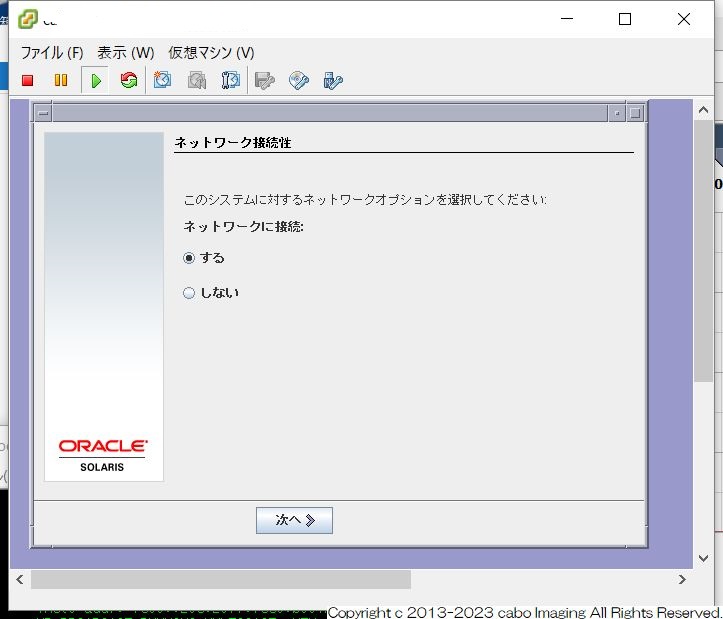
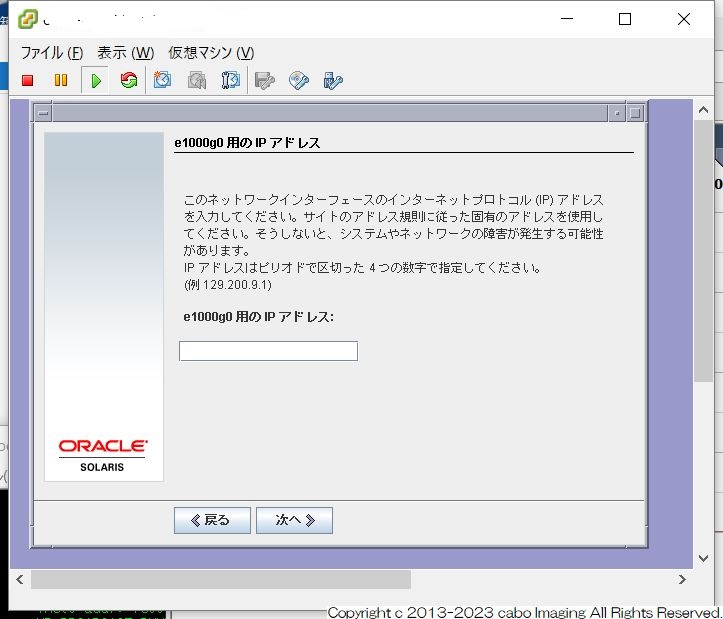
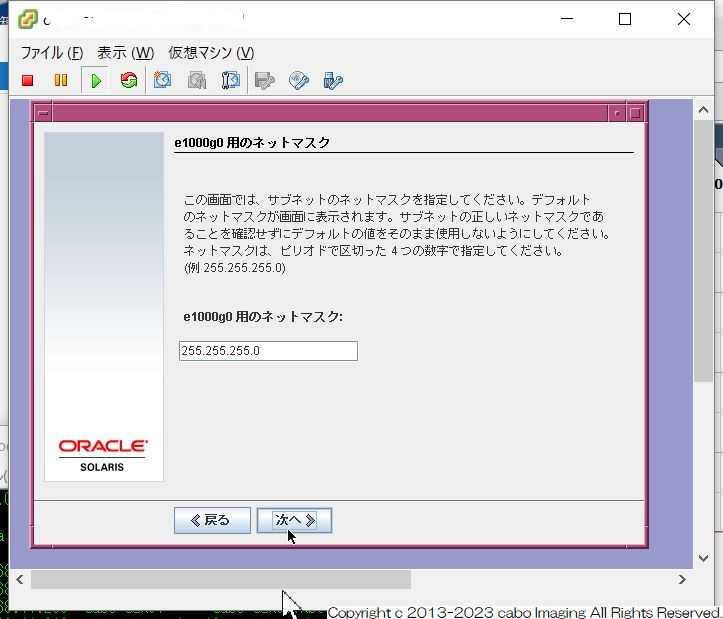
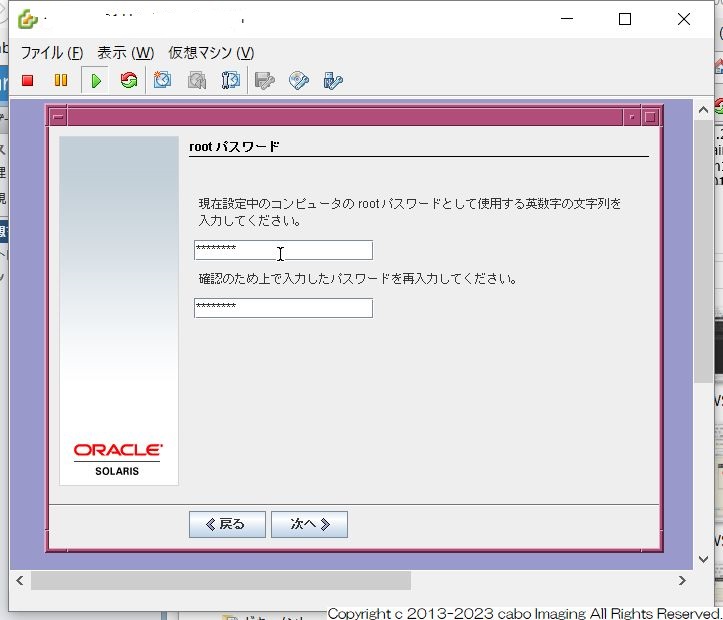
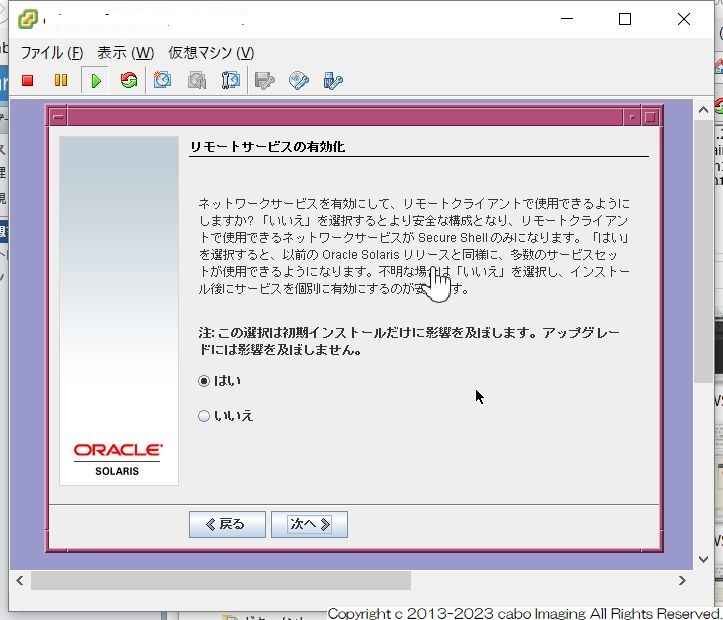
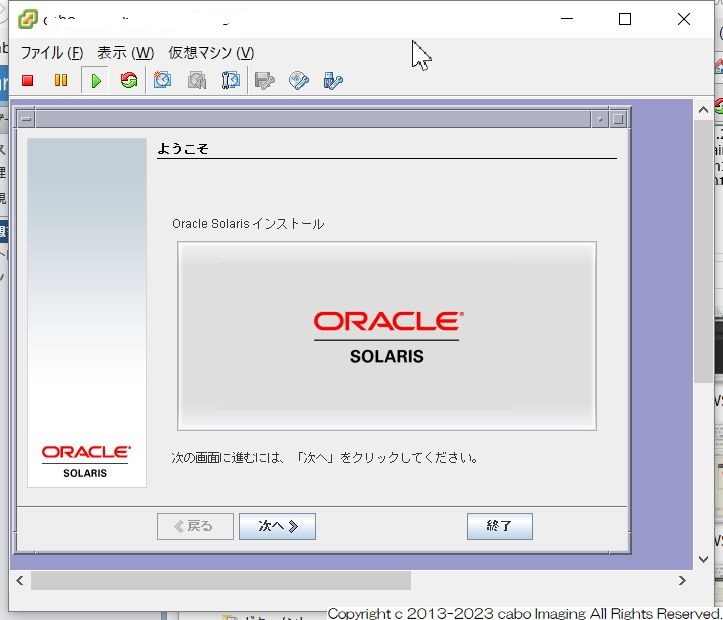
Solairs10 x86-64インストール
備忘録チックな
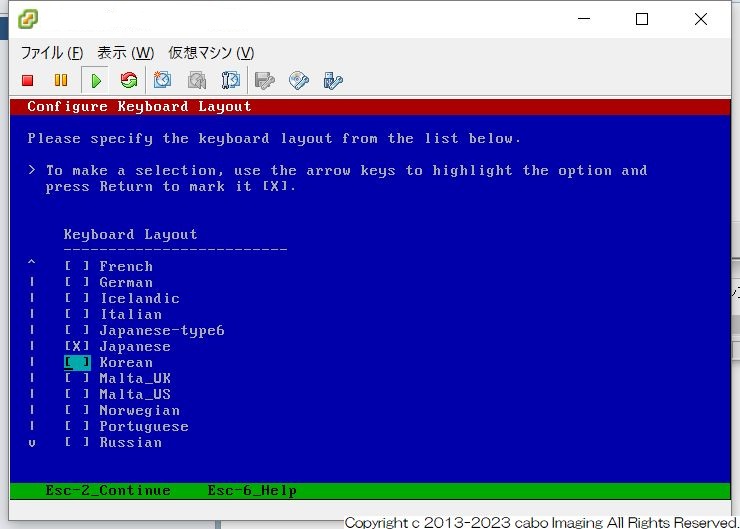
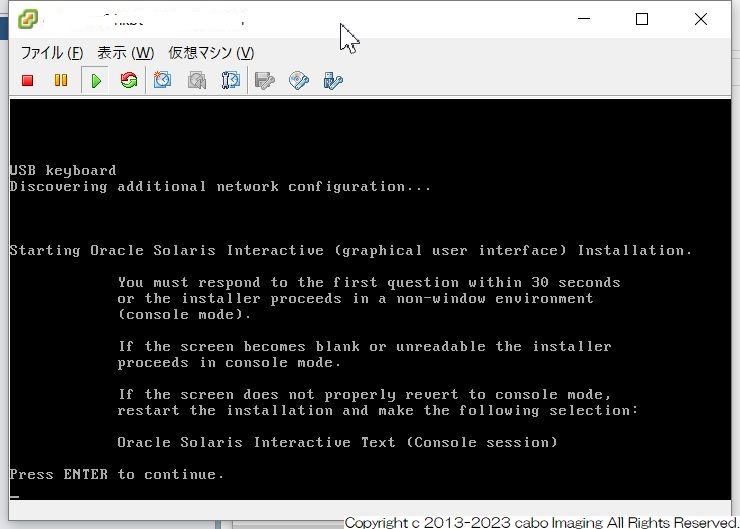
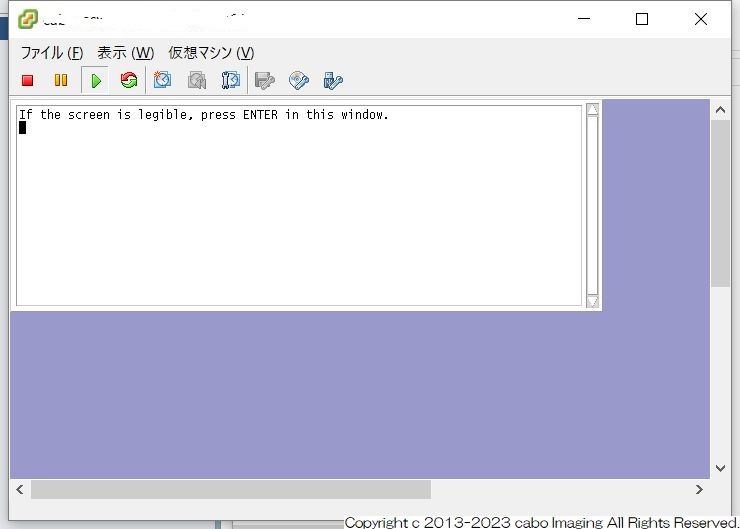
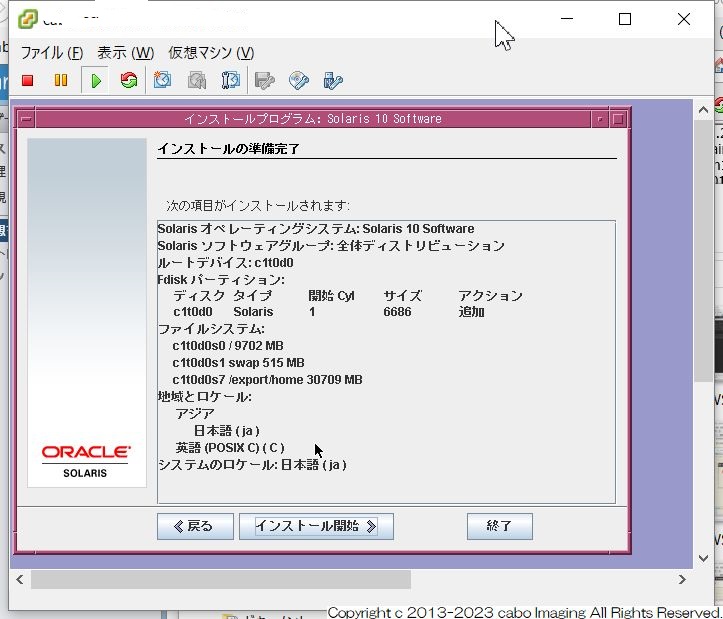
Solaris10-x86-64のインストールです。
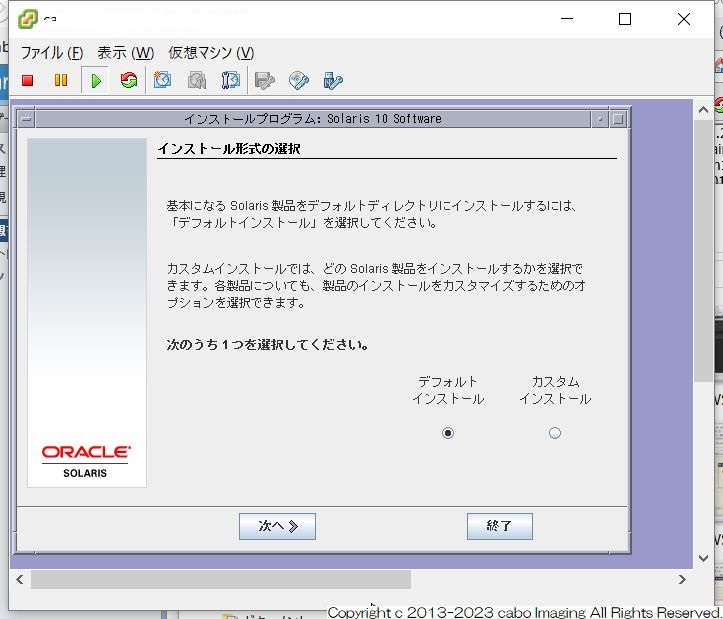
GUIツールなので特に選択肢で迷うことはないかと。
[キーボード選択]
[確認]
[確認]
[言語選択]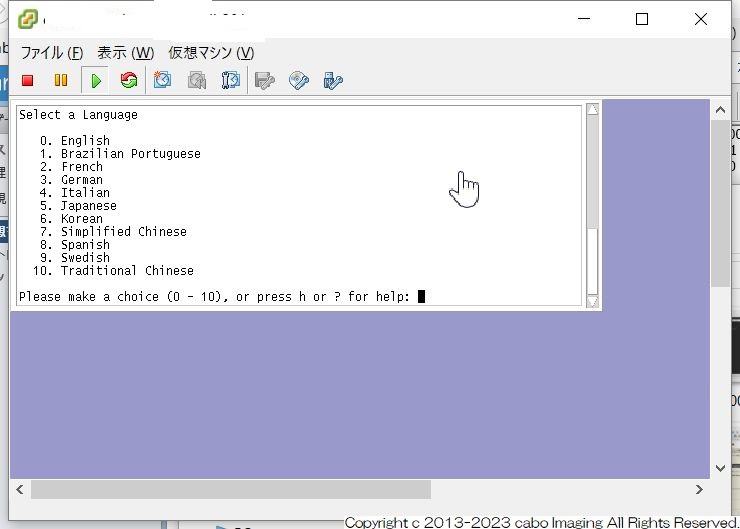
[イントロ]
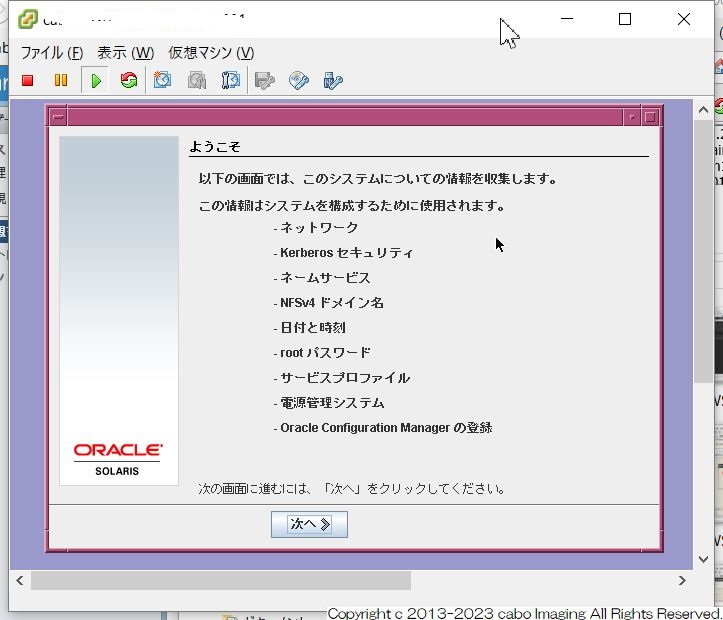
[ネットワーク接続]
[インターフェイス指定]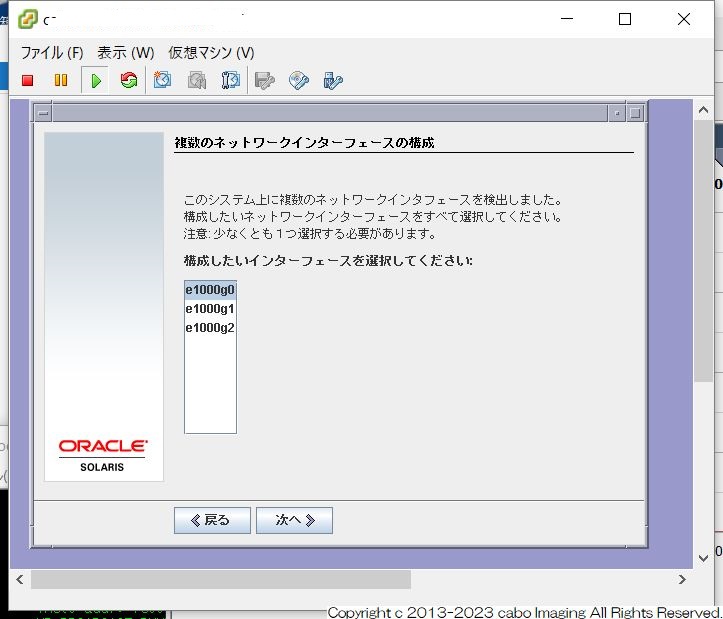
[DHCP指定]
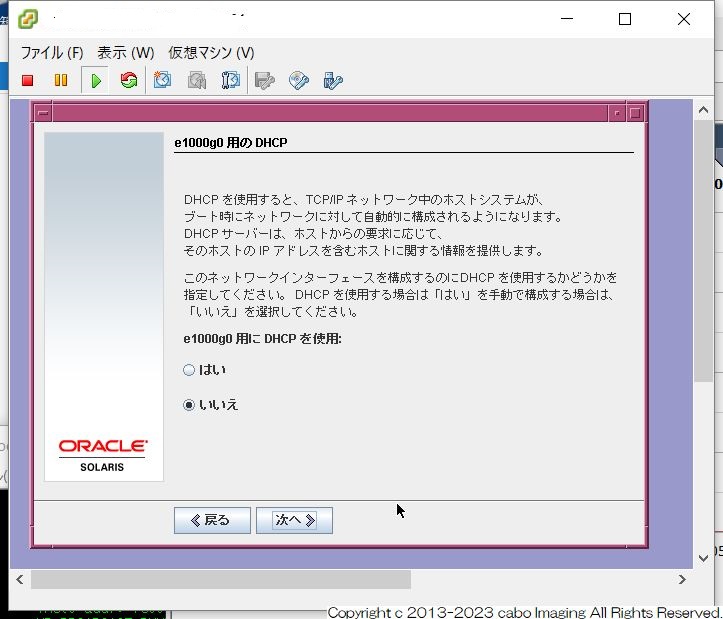
[IPアドレス]
[ネットマスク]
[IPV6]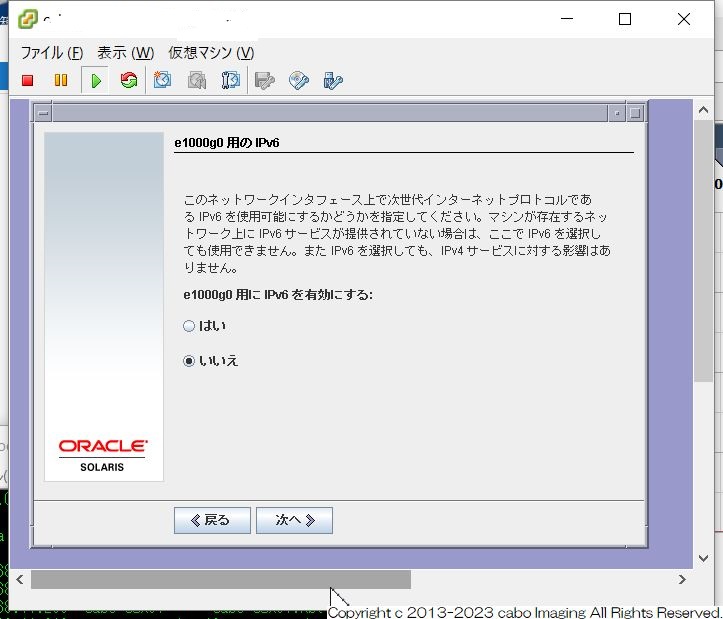
[defaultGW]
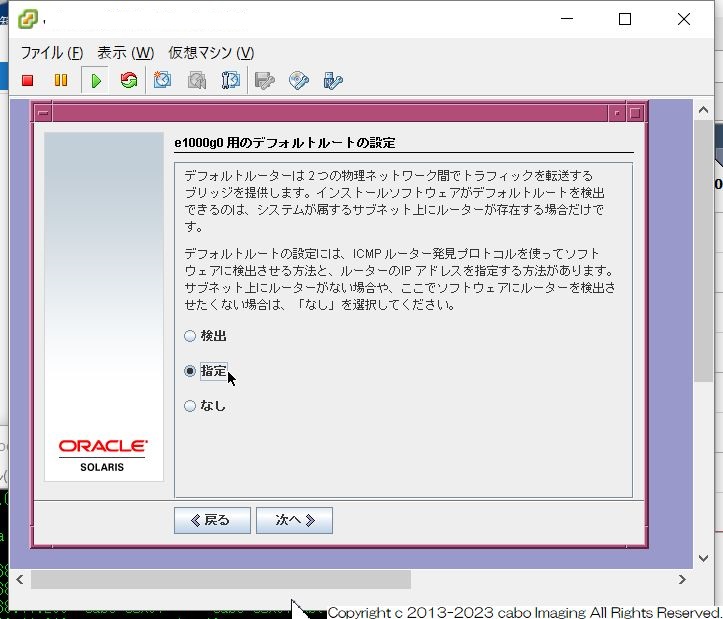
[DaultGW IP]
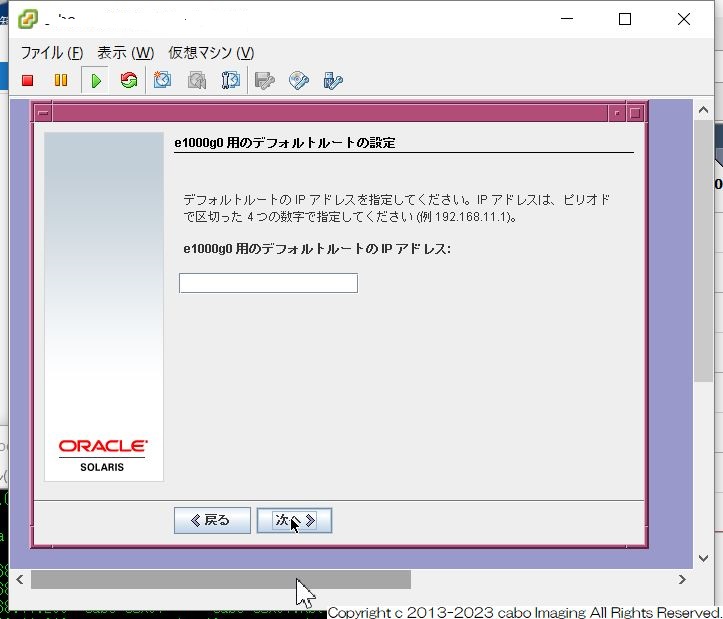
[NFSv4選択]
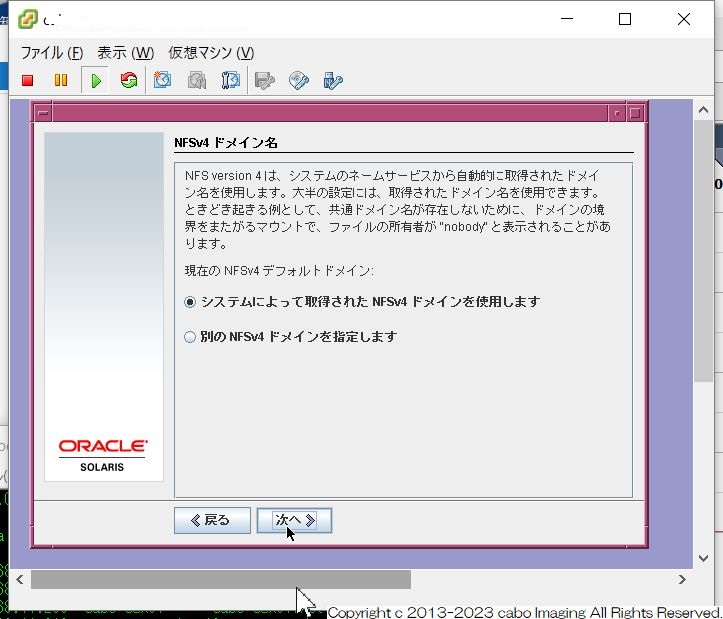
[時間帯]
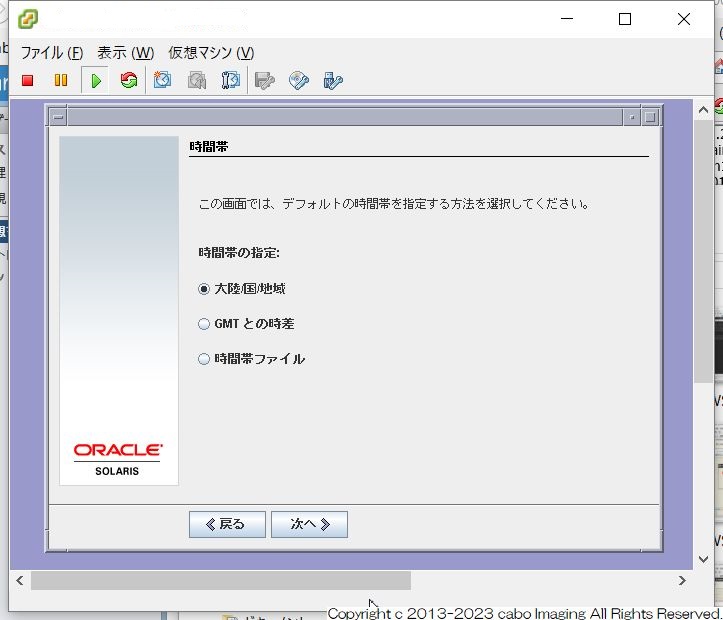
[時間帯選択]
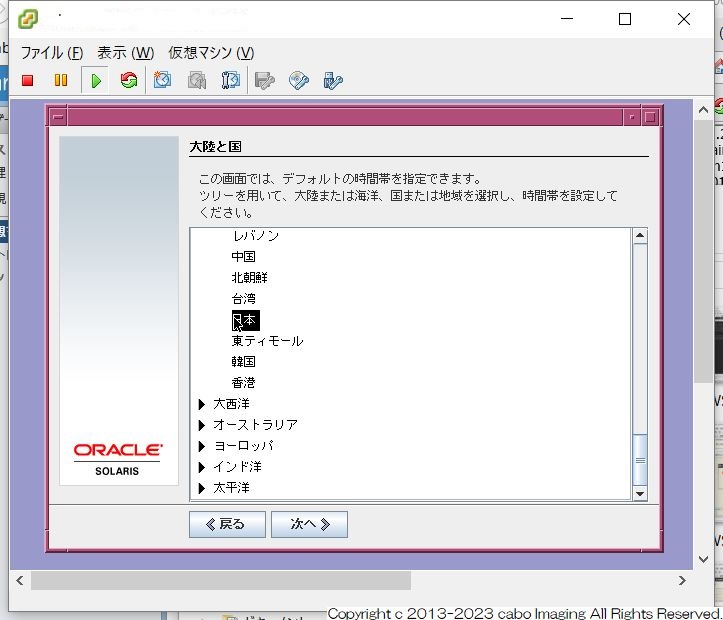
[時間指定]
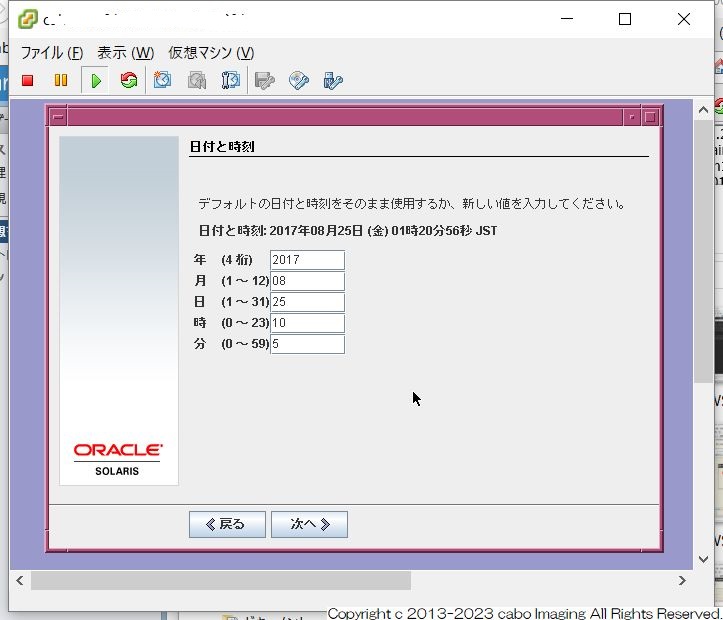
[rootパスワード]
[リモートサービス]
[確認]
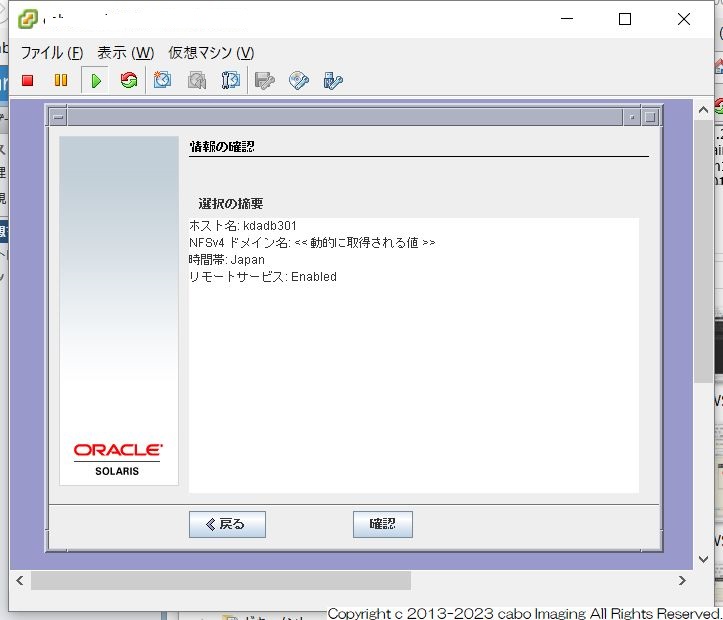
[確認]
[インストーラオプション]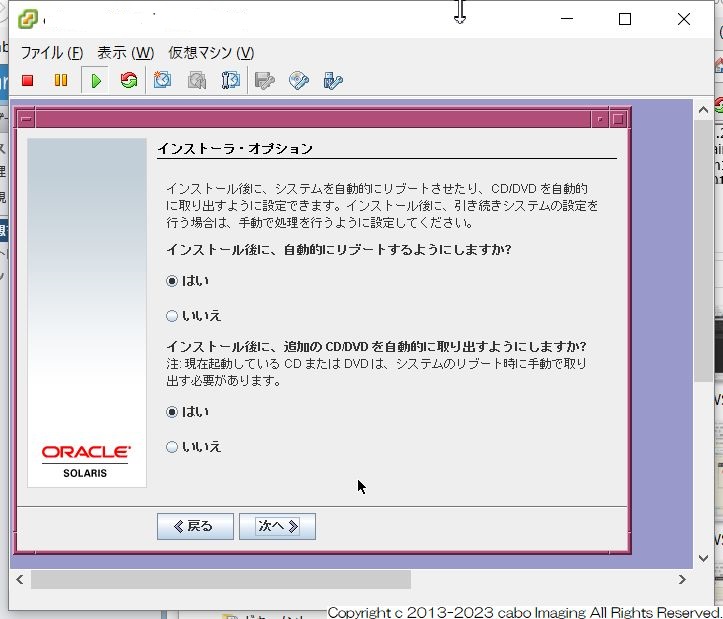
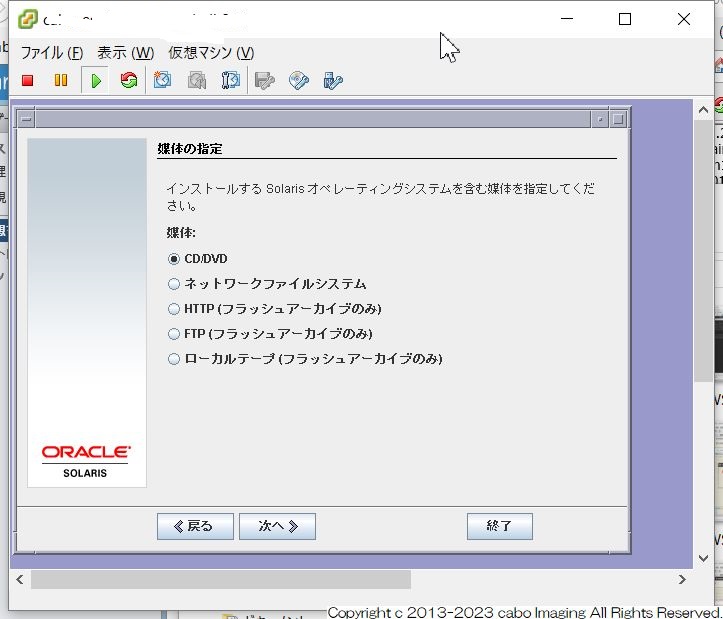
[媒体の指定]
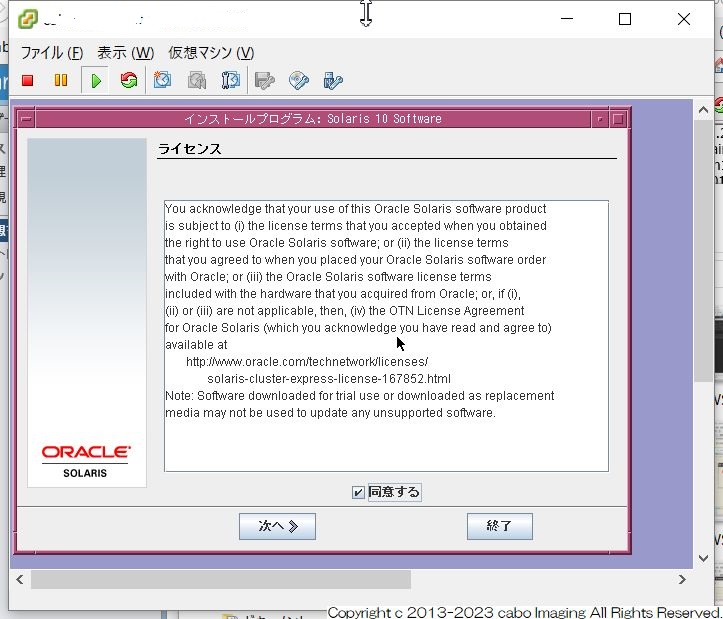
[ライセンス]
[インストール形式選択]
[インストール開始]
iphone7 plusのポートレート機能について
こんばんわ。
今回はiphone7plus のポートレート機能について少し検証したので書き留めておきます。
iphone7plusにはf1.8の35mm換算 約28mm相当と、35mm換算 約56mm相当のデュアルレンズの構成になっています。
結構これが電子ズームにする必要がなくきれいに撮れるので重宝しているのですが、なかでもポートレートは面白い機能で多用しています。
機能自体はかなり取り上げられていると思いますので少しだけ。
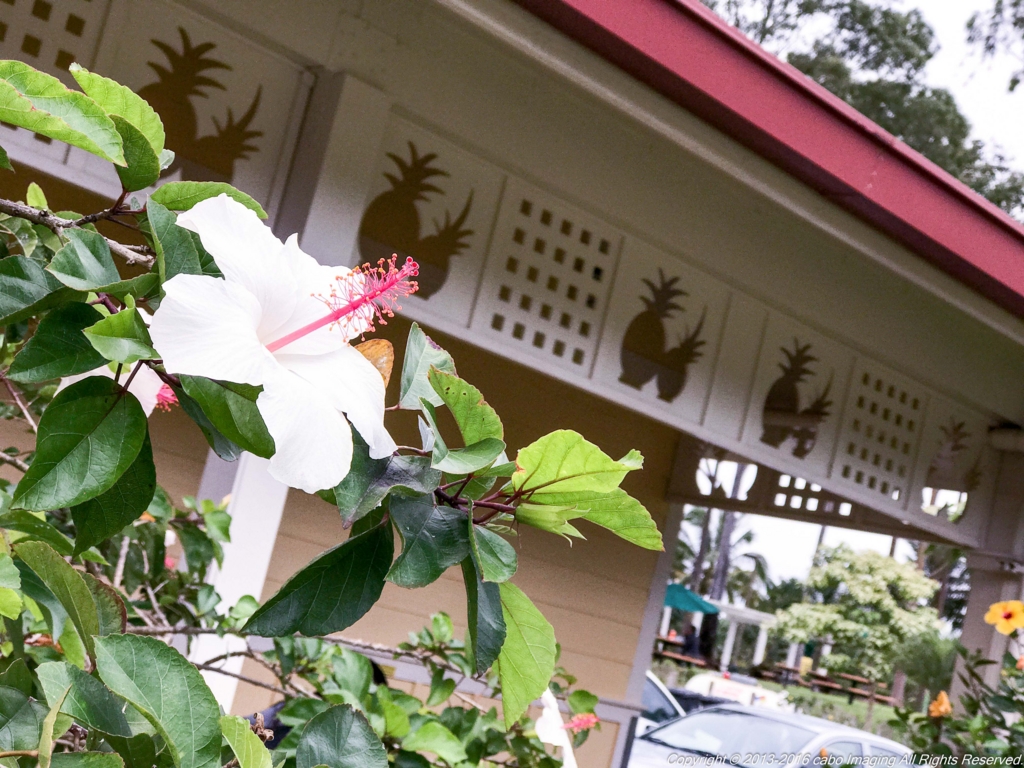
[ハイビスカス:通常写真モード]
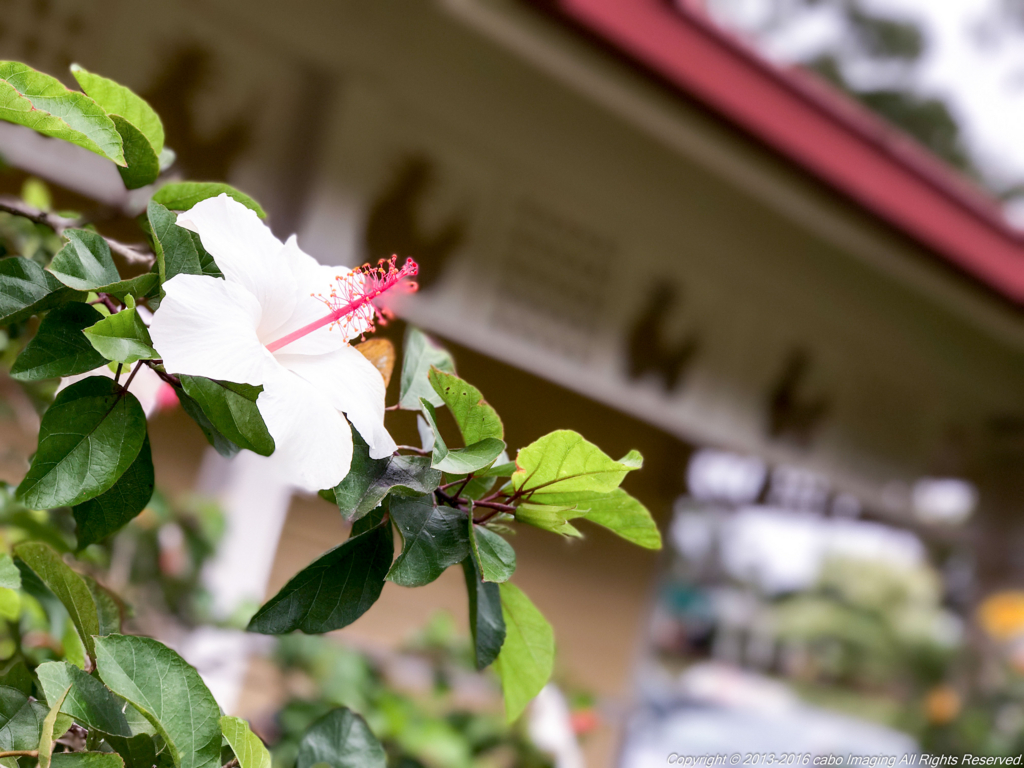
[ハイビスカス:ポートレートモード]
望遠側がメインカメラになり、広角レンズで被写界差分を動的に検出してぼかしのような画像をリアルタイムで提供している。ほんとにすごい。
ほんとに背景を消してくれるので、非常に写真がまとまる。私のような素人にはうってつけの機能。
こんな感じで雑味を引いてくれる。
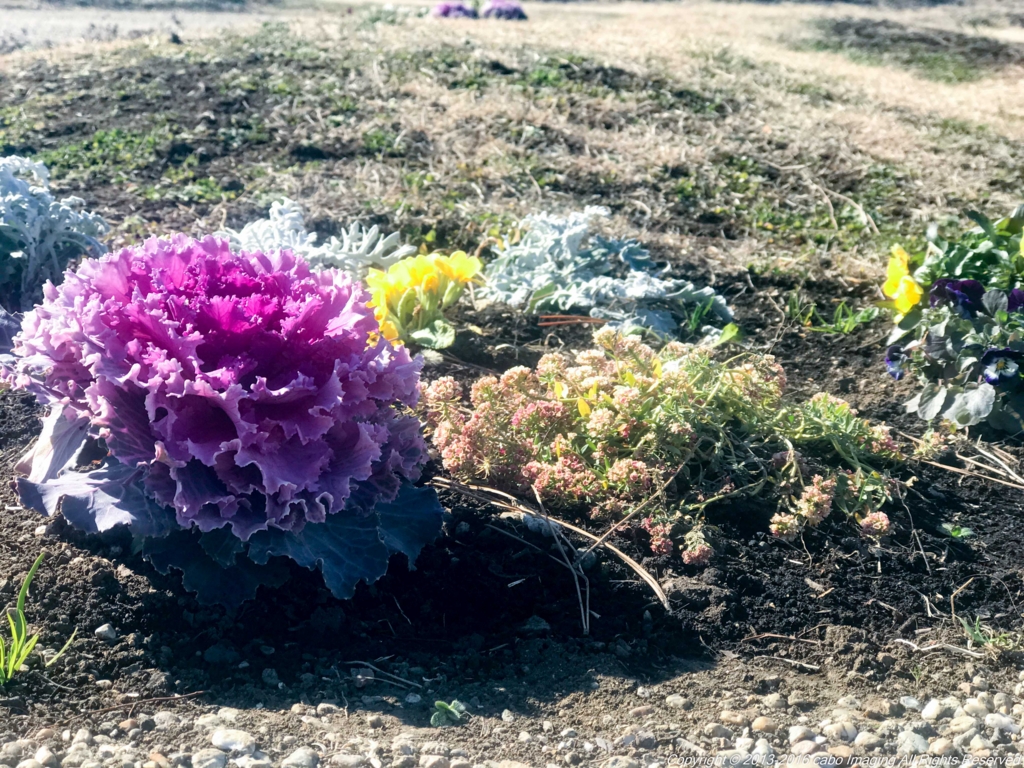
[葉ぼたん:通常写真モード]

[葉ぼたん:ポートレートモード]
しかしまだベータ版なのか、機能的には限界なのかフォーカスポイントの被写体だけを意識している感じでこのような遠近があっても被写体とは認識できないパターンもあるようです。すこし贅沢を言い過ぎかも。
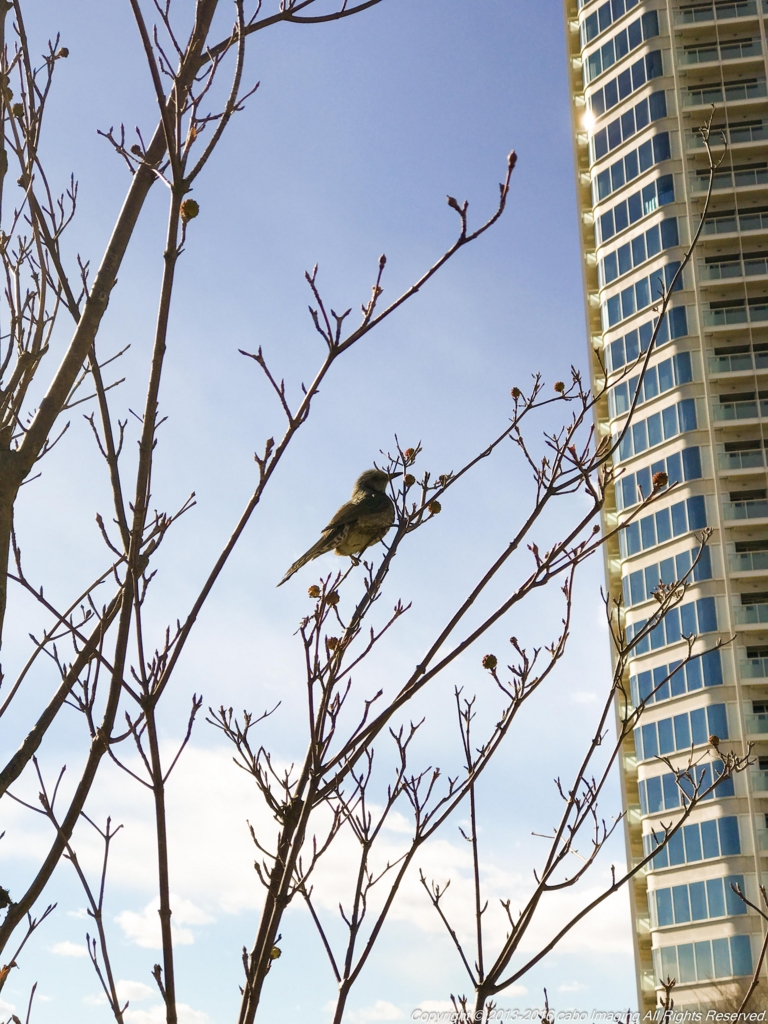
[ムクドリ?:通常写真モード]
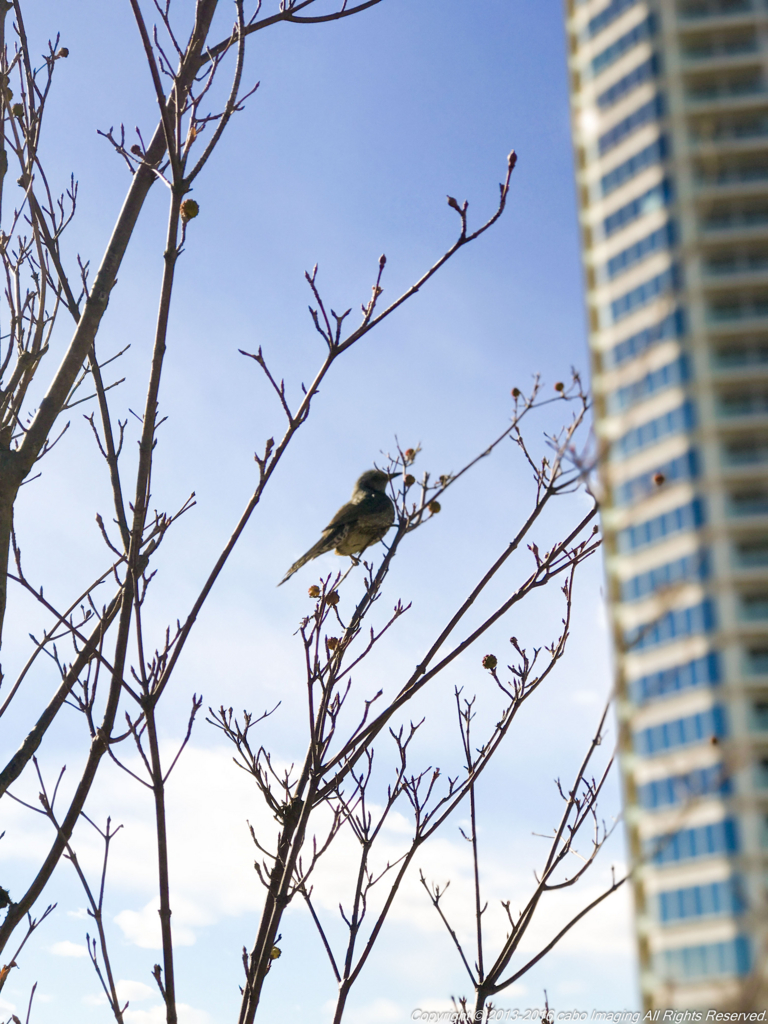
[ムクドリ?:ポートレートモード]
なにか無理やり感がでているかも。
実際どの程度の被写界深度なのか感覚的にもよくわからなかったので一眼での写真と比較してみた。
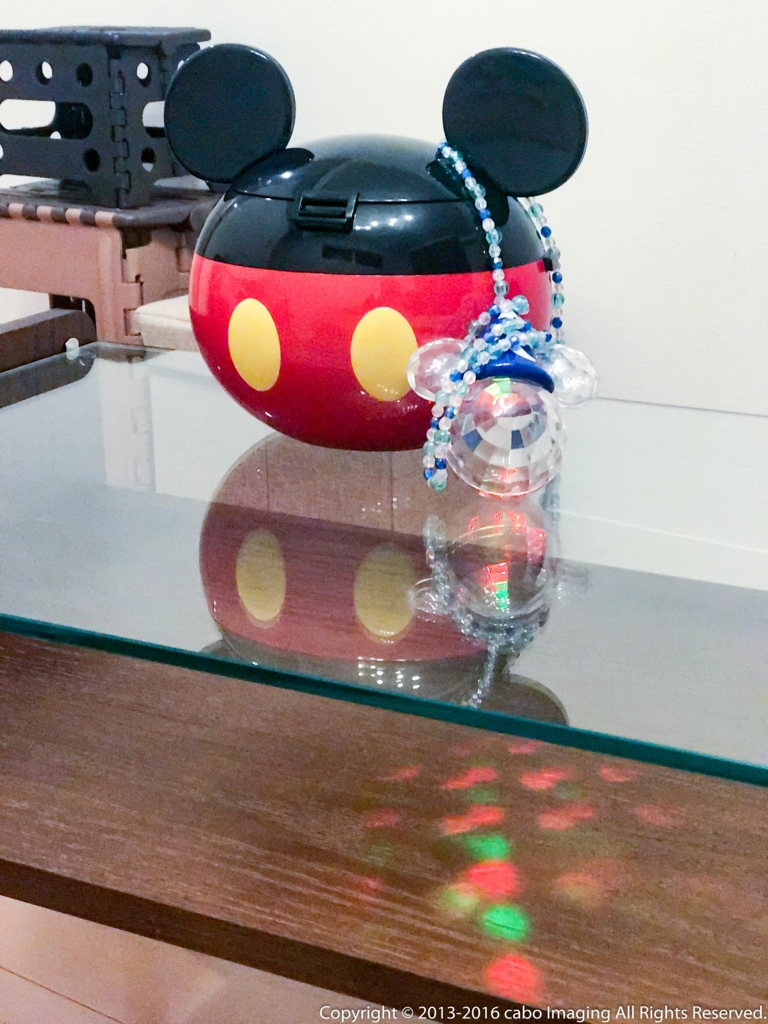
[室内:通常写真モード]

[室内:ポートレートモード]
56mm相当、f2.8での撮影になっていたので、だいたい同じ感じで撮ってみた。
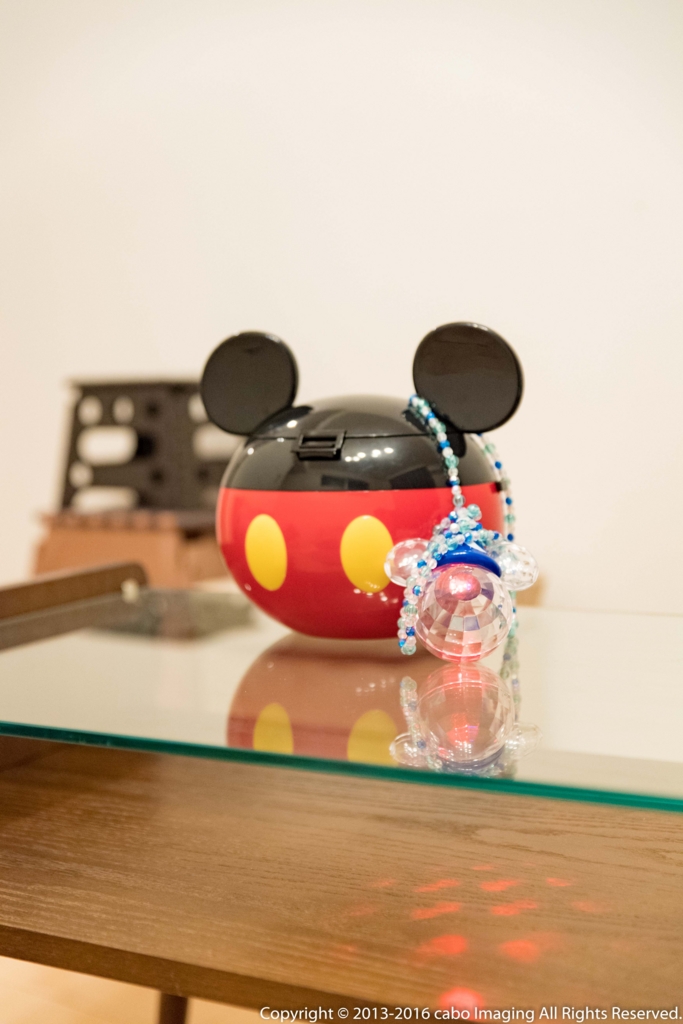
[室内:NikonD5+24-70 (56mm f2.8)]
なんとなく、背景の台座のボケ感はおんなじ感じですね。ただ、手前のミッキー君もボケボケです。
大体ですがこれくらいが被写体が網羅できてるかと。
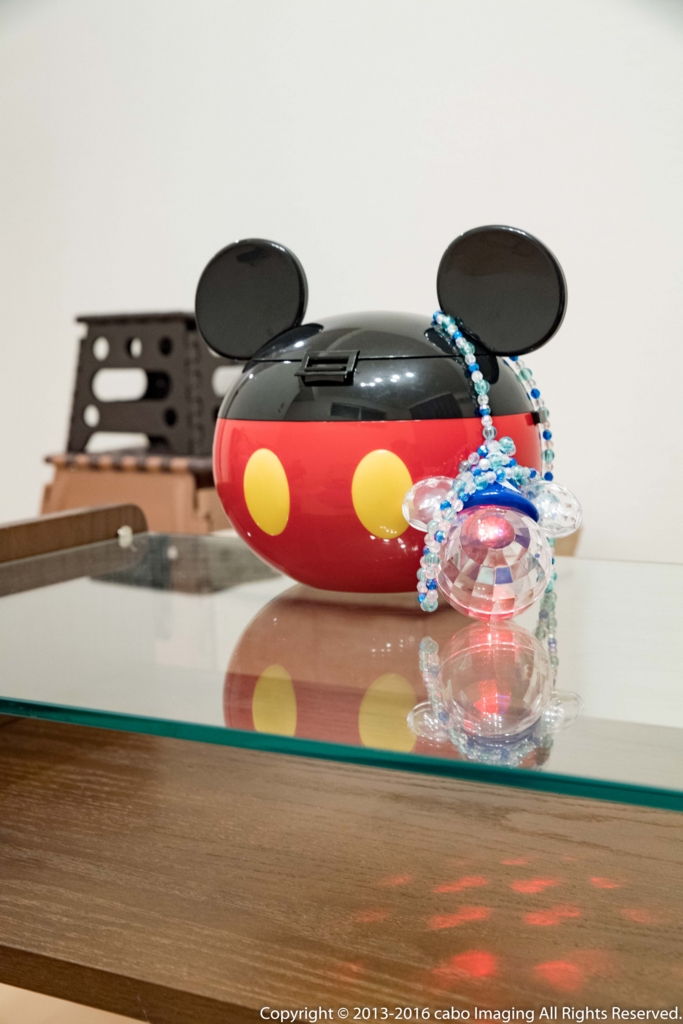
[室内:NikonD5+24-70 (56mm f7.1)]
フルサイズでもやはり広角なのでボケ感はあまり出ないですね。(ちなみにあまりに色味が違ったので現像でノイズ、白み、色温度など変更しています。)
iphone7plusのポートレートと同じボケを作ろうとしても工学的には厳しい場面も結構あるのかなといった感じでした。
ただ機能的には非常に優れいているので今後も使い倒してまた、何かわかればアップしたいと思います。
<初めまして>閲覧ありがとうございます。.
こんばんわ。関西在住のcaboと申します。
簡単ですが自己紹介をさせていただきます。
IT関連でインフラ系が主になります。
趣味はスノボー、サーフィン、山登りなどアウトドア全般です。
当ブログで取り上げたいのは大きく3つぐらいを予定しています。
(多分、すぐネタ切れでうす~い内容かもしれませんが(´・ω・`))
- [ カメラ ] 趣味のカメラでの撮影に関して。結構現像が好きです。
- [ IT ] 仕事がら扱うことが多いので。基盤系、DB系、データ連携、仮想化、クラウドなど
- [ アウトドア ] ライフワークの山登り、サーフィン、雪山、バーベキュー、旅行など
できるだけ更新頻度を落とさないように頑張っていきたいと思います。
もし興味が少しでもあれば見ていただけるとうれしいです。
では、今後ともよろしくお願いいたします。
